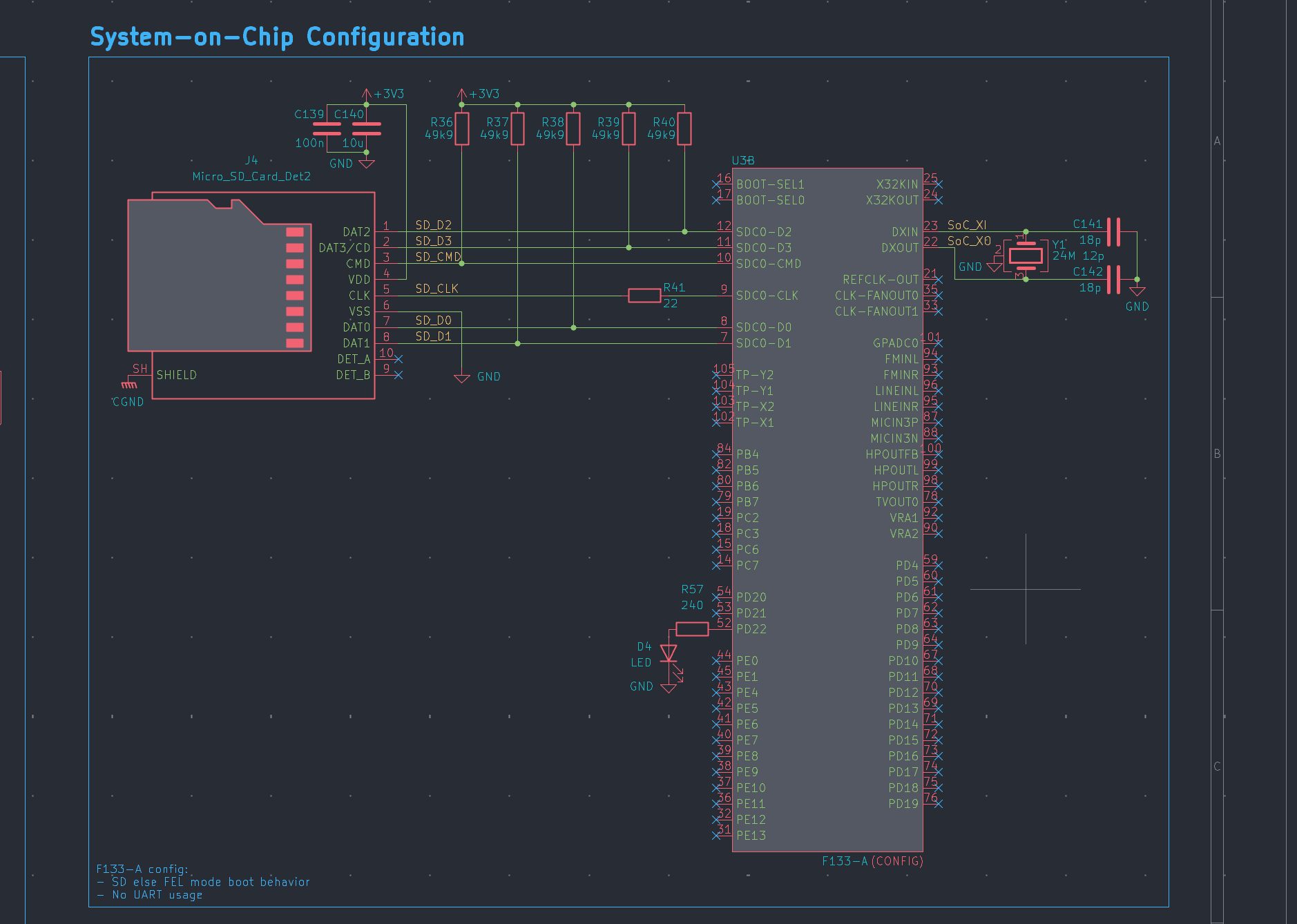
soc
Last week, I covered the power schematic. This week, we’ve also got a data schematic, split in fewer but larger sections. First up, we need to configure the System-on-Chip. In general, I opted for doing chip configuration without any additional board flash memory that must be written in advance. Instead, we go with strap resistors as much as possible across all chips. However, we need some place to store the actual operating system that the F133-A System-on-Chip in particular boots from. It’ll be the same storage from which any binaries are shipped to worker devices. We have a basic SD card in a slot wired to the SoC, which is cheaper in small volumes than actually assembling flash on little cloud’s board. Beyond that we mostly only have a crystal for the clocking the SoC.
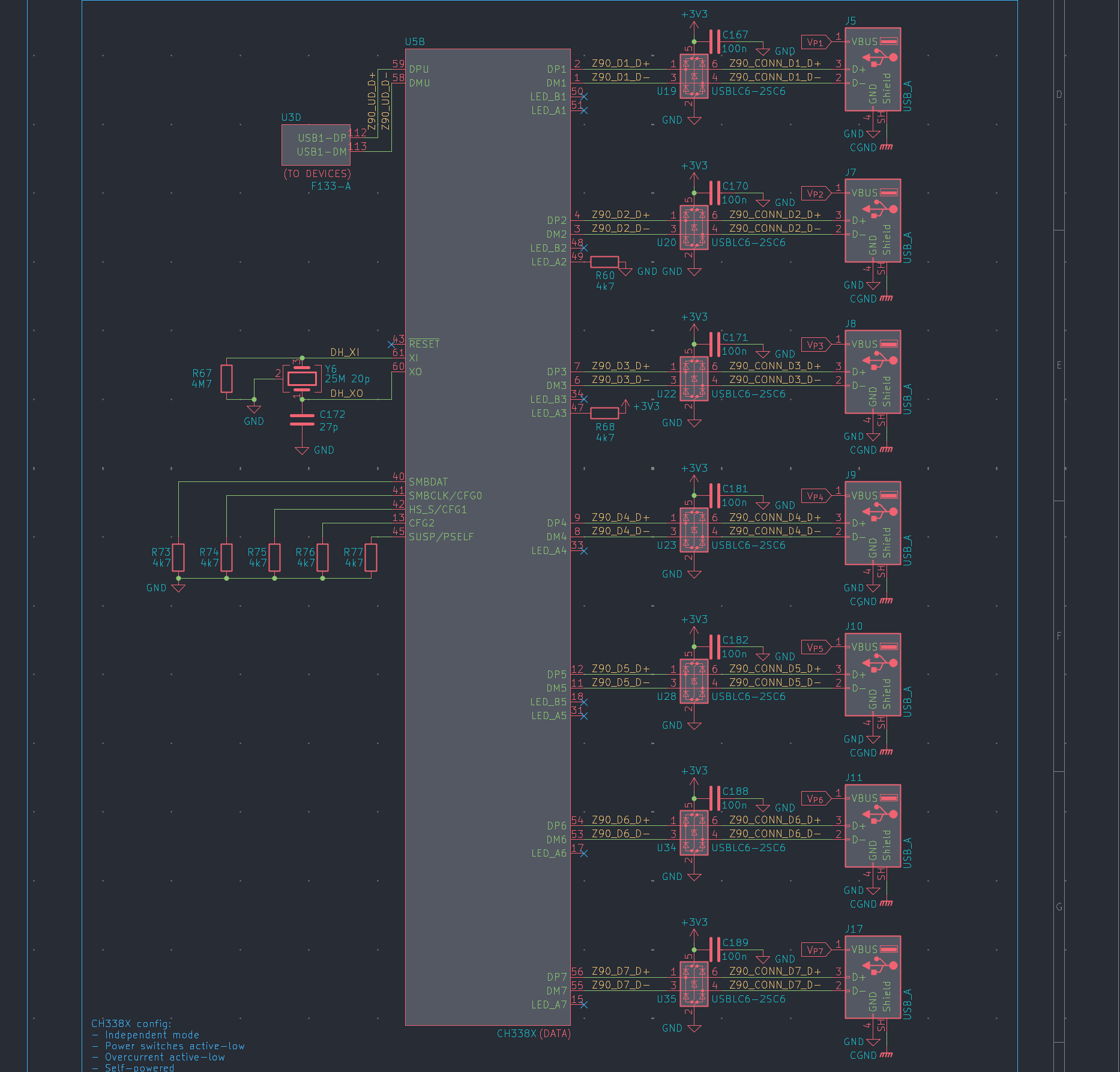
devices
For connecting to workers that typically act as USB devices, such as smartphones and tablets, we connect the SoC as the upstream on a CH338X hub, which connects downstream to ports. We’ve added some CH412K chips which bring ESD protection tailored for USB differential pairs. We use strap resistors to ask the hub to behave in certain ways, such as to match the polarity of the pins it uses to command the per-port power switches on the power schematic, or for reporting that it’s self-powered (rather than powered from upstream), which allows it to meaningfully charge downstream workers. It gets a clock, too. Plus, I was thinking of having one LED per port driven by the SoC instead of relying on the various LED outputs on hubs and switches that vary in semantics. You can see the LEDs in the top-left, on a subunit of the SoC symbol. I split the SoC into 4 subunits after all, to make the data schematic sane.
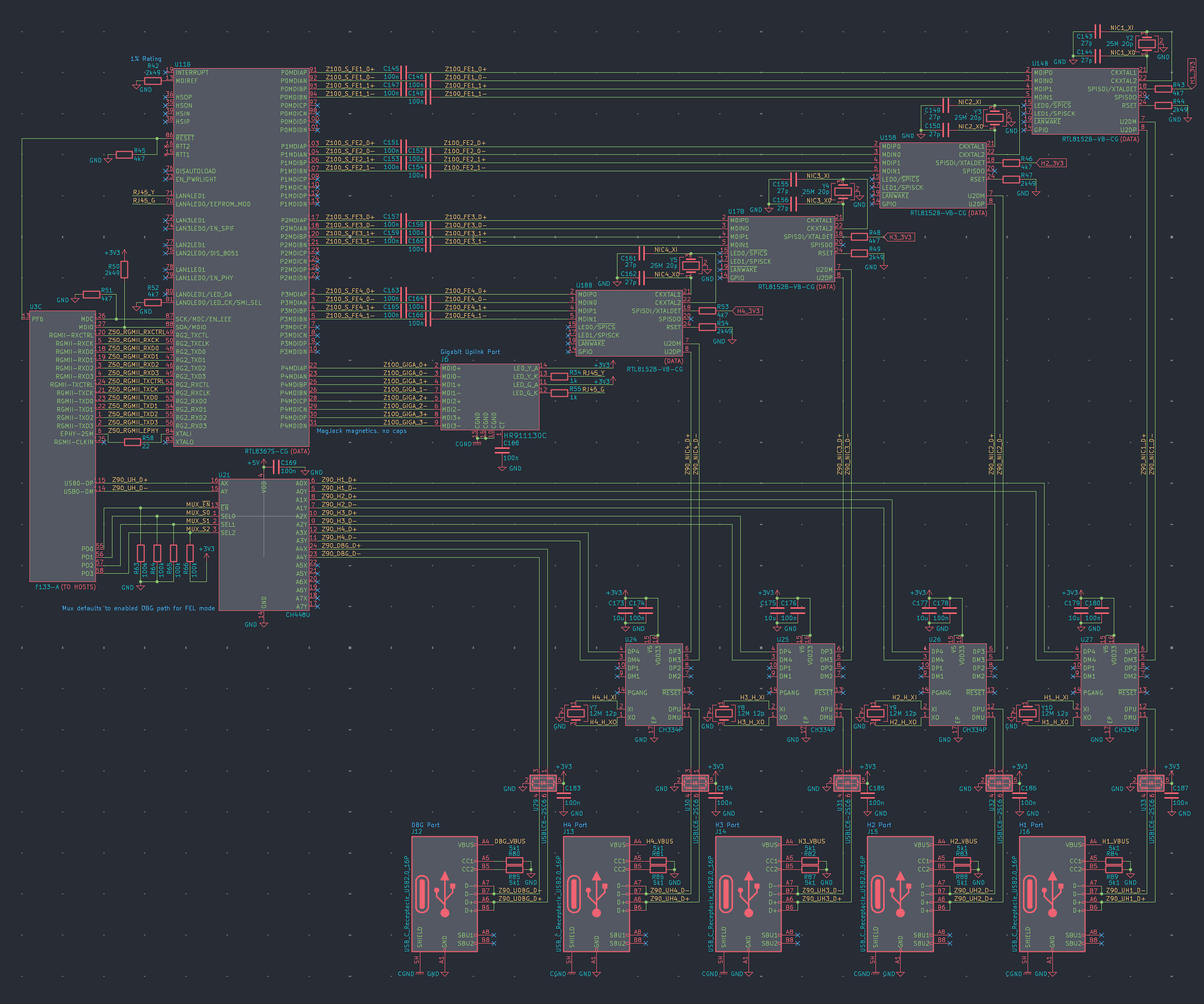
hosts
This was undoubtedly the final boss of the individual circuits across both schematic pages. It took a day on its own, but was arguably also the most satisfying to look at as it was taking shape. The multiple layers of repeated patterns feel almost artistic.
The idea of communicating with hosts since a few weeks ago was to rely on a constellation of fixed-function chips. Ports going to workers that act as USB hosts, such as laptops, desktops, and servers, feed into a per-port CH334P ($0.2 @ 1K) as the respective upstreams. As a downstream on each hub, we have a per-port RTL8152B USB-to-Ethernet NIC that feeds into a unified RTL8367S Ethernet switch. This grants these workers a baseline of network connectivity. But in addition, the SoC’s only device-capable USB bus feeds into a CH448U analog switch that can connect as downstream to one of the CH334P hubs, enabling further specialized device profiles during recruitment, such as a flash drive, keyboard, video output, etc.
This was the approach after a minor course-correction triggered by a scare I had. Previously, instead of a CH334P per port, I was thinking of a CH442E 2:1 analog switch that could select either fixed network via a NIC or flexible USB device profiles via the SoC’s bus. But in that case, I would’ve had two switches in series, one from the port and one on the SoC’s bus, which might have degraded speeds from USB high-speed (480 Mbps) to full-speed (12 Mbps), yikes. So I thought maybe we could replace these with the cheapest possible hub ICs, smaller and dumber than the CH338X. This costs a whopping 0.1$ more per port! In return, it solves the signal integrity concern, allows simultaneous port connections to its NIC and the SoC, and saves the SoC two GPIO pins per port which we used to toggle the previous switch.
Also, by default, the SoC’s device-capable bus is wired to a dedicated debug port, through which it will be programmed and tested during manufacturing. We’ll see if we can manage without any UART or JTAG shenanigans.
impedance
After the “final draft” for the power and data schematics, I started working on the actual PCB layout. The schematic focuses on how parts are meant to be connected functionally, whereas in the layout you answer questions about where to actually place parts, and you worry about the physics of their connections. For the physical buildup, I entered the specs of the standard JLCPCB buildup, the right thicknesses of layers, etc. So far, so good.
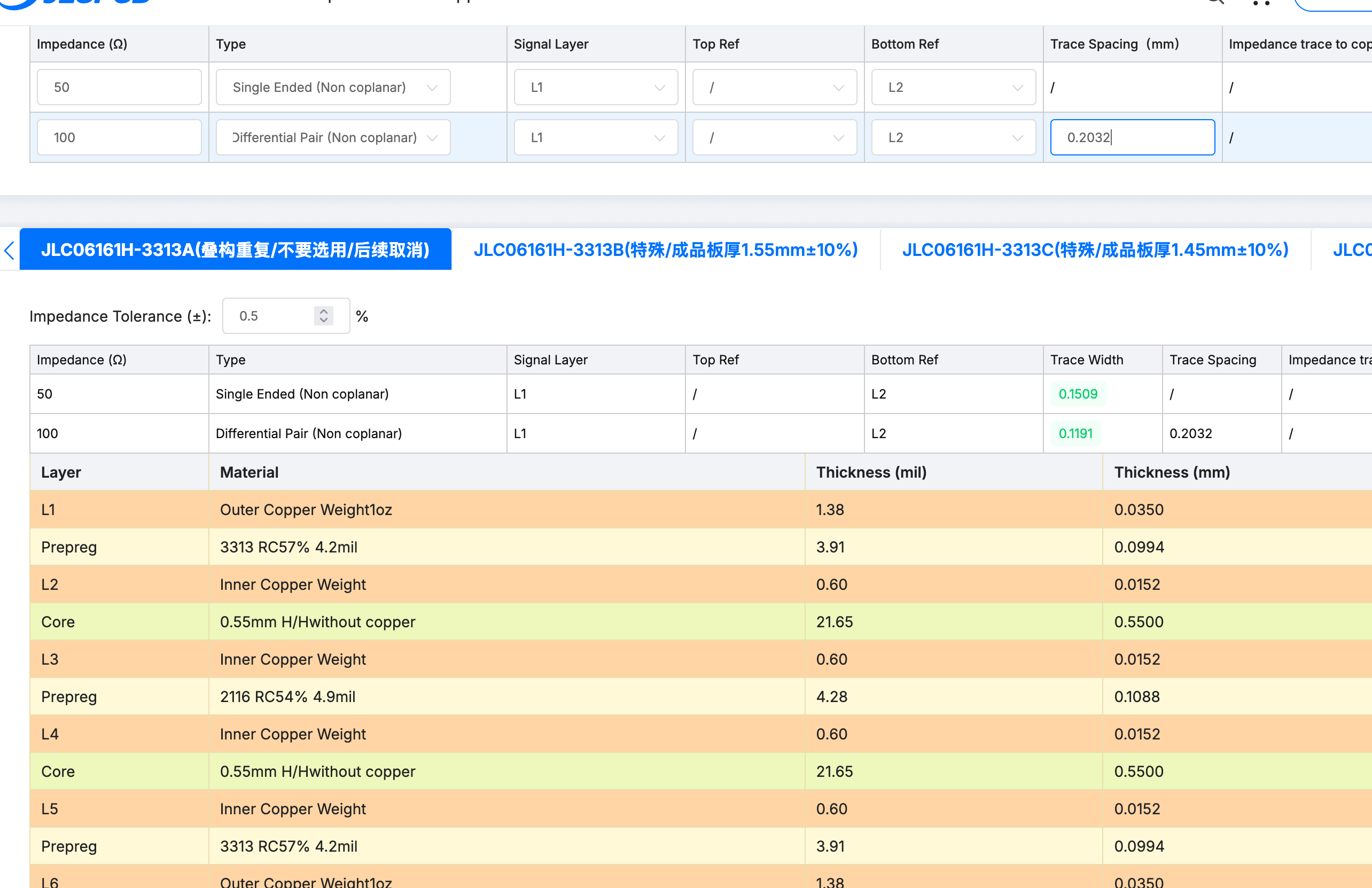
What I wrestled with more was the controlled impedance part. Various data protocols, such as our USB high-speed, 100 Mbps Ethernet, or Gigabit RGMII, require the traces through which they’re connected to be tuned in width and gaps to hit certain target impedances, such as 90 Ohm differential for USB high-speed. I was overthinking for a bit whether it’s worth doing anything else other than one rough 100 / 50, differential / single-ended profile throughout. Even Phil from the advanced digital hardware design lumps everything on his board on a single 100 / 50 profile, and usually I feel like he’s overzealous with his worries (do hardware designers really need to be worried about the fiberglass weave!?). That said, I was paranoid about the 100 Ohm impedance already being slim on tolerance for USB’s target, and that’s before taking into account the manufacturer’s own ±10% wobble. So I went for peace of mind and settled on just doing separate 100 / 90 / 50 impedance profiles.
In his KiCAD course, Phil defines trace thicknesses and then thinks about when to use which during routing. I found what seems like a more maintainable approach using “net classes” and assignments of net labels to such classes. Basically, I defined a net class for each of the three impedance profiles, and added wildcard rules to assign any net whose label contains “Z90” to the 90 Ohm differential impedance profile. The required trace widths and gaps I got from JUCPCB’s calculator. Note that impedance is impacted by distances to nearby plane(s), and because I settled on the internal L3 layer for my main high-speed routing, impedance profiles are only valid there. Though I also configured the default to be 50 Ohm single-ended on the outer L1 layer, because why would we stray too far from target impedances even below critical trace lengths?
parts
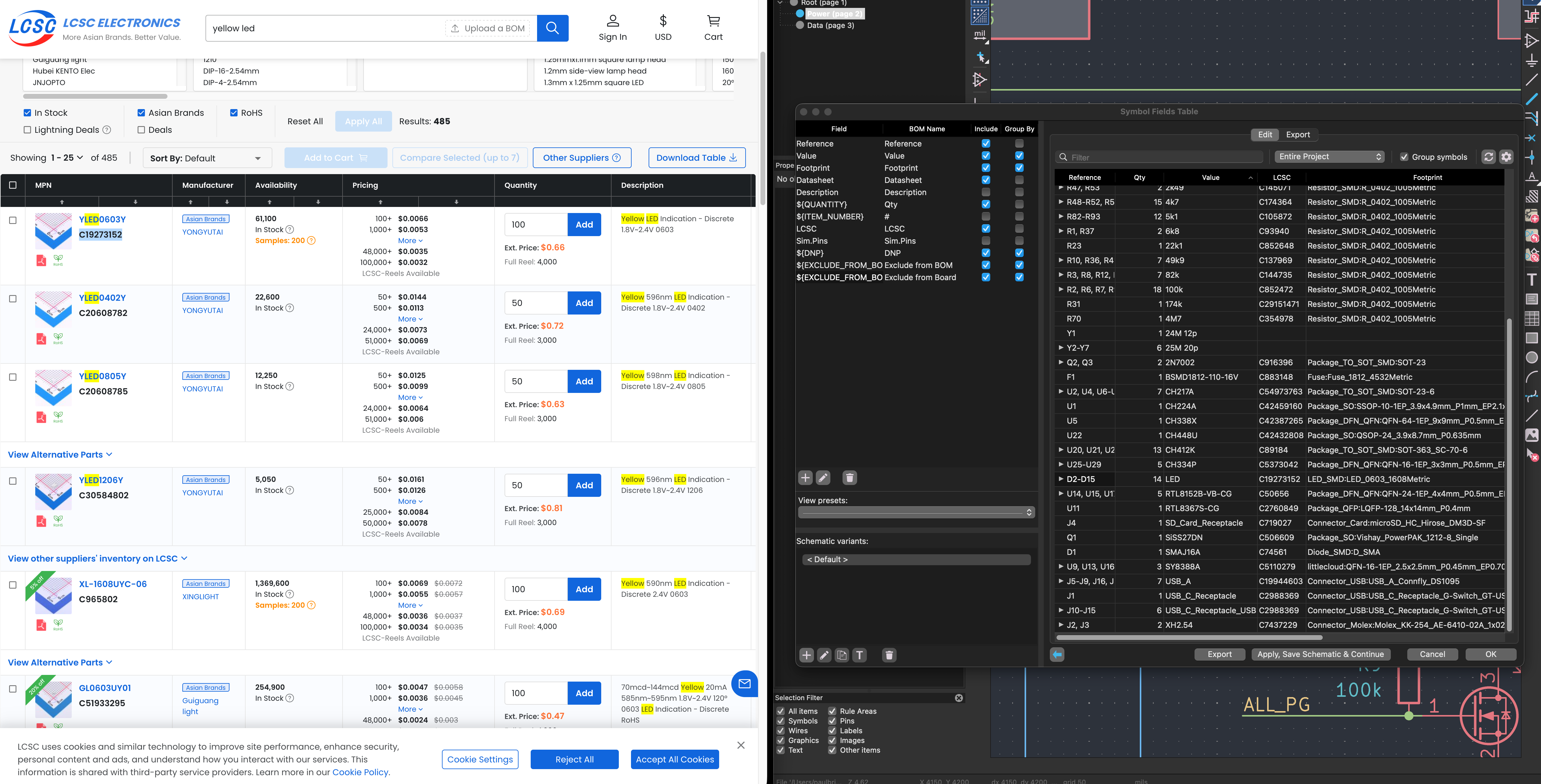
The two schimatic pages contain a few hundred symbols between them. If we want the circuit board manufactured, we need to assign each of these actual product numbers from a real distributor, such that the manufacturer will know where to place what concrete part. With LCSC and JLCPCB, the distributor and manufacturer is the same conglomerate, but we still need LCSC codes for each part, down to the last resistor. The actual parts of choice obviously dictate the footprint, and so it makes sense to do this bookkeeping before layout and routing. Because why would we intentionally have to redo it later when we find out we had different footprints to work with. It’s true that we knew the important parts for a few weeks now, which microprocessor and switch and such. But now’s the time to concretize the bulk caps and inductors and such.
Now’s also the time to do a few cost shaving passes. Because why would we redo the layout after a later swapped part. So I did a few passes of trading excessive part specs and ratings for a few dollars of at 1K volume, while still staying within safe ranges. Just made the margins a bit tighter while effectively keeping functionality constant.